Skip to content

Halyx on a Stream Deck, with Companion

The Companion module ships with Halyx. Imported once, it finds the Halyx computer on the network and offers your sequences, pages, faders, groups and palettes as ready-made buttons.

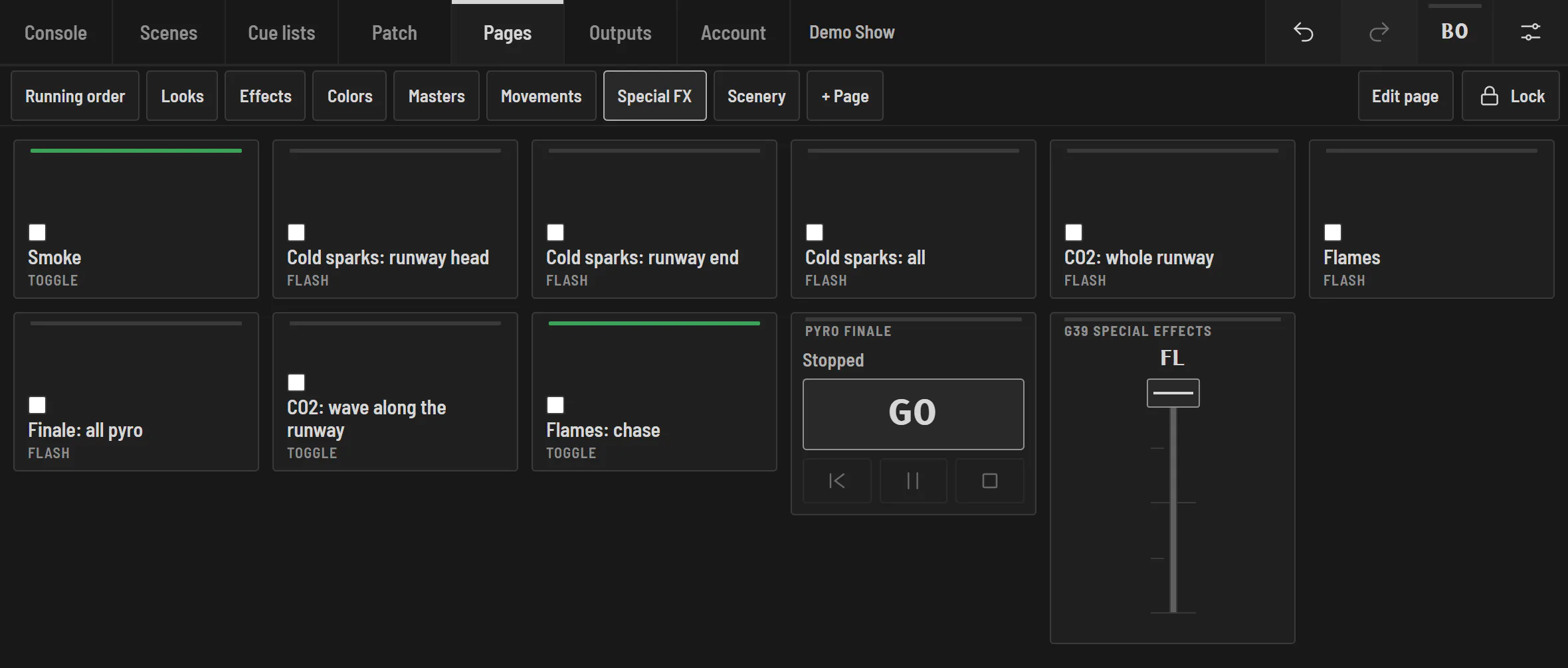
Halyx custom pages on a tablet: a Special FX page made of scene buttons (toggle or flash), a sequence GO and a group fader, ready to hand over on a locked screen.

Buttons that show what is playing

Companion (Bitfocus) drives the Stream Deck and dozens of other surfaces. With the Halyx module:

  • your sequences (GO, back, pause), page buttons, faders, groups and palettes arrive as ready-made buttons, with their names and colours;
  • buttons light up according to what is playing: current cue, scene on, blackout;
  • everything follows the show as you edit it in Halyx;
  • on another computer, Companion signs in with an access code, like a tablet.

The module is in Halyx: Outputs › Remote control › Companion module.

And without Companion

Halyx OSC answers TouchOSC, QLab and any software that speaks OSC (UDP 7812): faders, sequences, page buttons, palettes, internal timecode, release the programmer. OSC only listens to the Halyx computer, unless you open it to the network.

Frequently asked questions

Does the Companion module cost extra?

No: it ships with Halyx, on every plan. Companion itself is free (Bitfocus).

Which Stream Decks are supported?

All those Companion supports: Stream Deck Mini, MK.2, XL, +, Pedal, and Companion's other surfaces.

Try Halyx for free

Everything works without a licence, except the output to fixtures. 14-day Solo trial, no card.